Top AI Tools You Must Try in 2026
- April 13, 2026
- 0
You know the feeling. You open five AI apps, paste the same prompt into all of them, and still end up doing the real work yourself. That is

You know the feeling. You open five AI apps, paste the same prompt into all of them, and still end up doing the real work yourself. That is
You know the feeling. You open five AI apps, paste the same prompt into all of them, and still end up doing the real work yourself. That is why Top AI Tools You Must Try in 2026 is not just another trend list. It is a practical shortlist for people who want results, not hype. The biggest shift this year is simple: the best tools are moving from chat-only experiences into real workflows, agents, connectors, and everyday productivity.
If you are asking which AI tools I should use, the answer is to start small and build a stack that fits how you already work. One assistant. One research tool. One creation tool. One automation tool. That is where Top AI Tools You Must Try in 2026 becomes useful instead of overwhelming.
At TrendiFlux, we bring you the latest trends across AI, technology, business, marketing, and more. In this article, we break down what’s trending in 2026, why it matters, and how it can impact your daily work, content, or online growth.
The reason this market is exploding is not that people suddenly love more apps. It is because the latest AI tools 2026 are now doing practical work inside the places people already use every day. Google’s 2026 AI Agent Trends Report says agents will boost productivity and automate complex tasks. OpenAI says workers report saving 40 to 60 minutes per day with AI. Adobe’s 2026 trend reporting also points to generative and agentic AI reshaping how brands create and serve customers.
That is why the fastest-growing AI tools are no longer the loudest ones. They are the ones that remove friction. They live in your inbox, your docs, your browser, your chat app, and your design workflow. In other words, the tools that actually work in 2026 are the ones that save time before they try to impress you.
For US market trends, see the latest AI tools in USA.
If you are a beginner, start with ChatGPT, Grammarly, and Canva. That gives you writing, editing, and visual creation without a steep learning curve. If you already work in Google Workspace, Gemini is a better first step. If your job depends on research, add Perplexity. If your biggest problem is repetitive admin, use Zapier Agents or Microsoft 365 Copilot.
ChatGPT is the easiest all-around place to begin because it now supports everyday chat, deeper reasoning, voice improvements, study mode, and connectors for Gmail and Google Calendar. For a beginner, that means one tool can help with brainstorming, rewriting, planning, and simple analysis without forcing you into a complicated setup. A practical use case is turning a messy client brief into a blog outline, a follow-up email, and a social caption in one pass. The main limitation is still the same one every AI user learns: it can sound confident even when you should verify the answer.
Gemini is the best choice for people who live inside Google tools. Google says Workspace with Gemini includes the Gemini app, NotebookLM, and Gemini in Gmail, Docs, Meet, and more, which makes it a natural fit for business users, students, and solo operators already working in Drive. A real-world example is using Gemini to summarize meeting notes in Docs, draft a reply in Gmail, and clean up a presentation outline before a client call. Its limitation is simple: it is most valuable when your files and notes are already organized in Google’s ecosystem.
Claude is one of the best AI tools for writing and research when you need long-context thinking and cleaner reasoning. Anthropic’s latest Opus release highlights stronger coding, better agentic work, improved debugging, and a 1M token context window in beta, while Claude Code is built to read codebases, make multi-file changes, and run tests. That makes it powerful for analysts, writers, developers, and founders who need depth instead of speed alone. The limitation is that Claude can feel like too much machine for a simple task like a short caption or a quick reply.
Perplexity is the tool I would pick when the job is research, not just chat. Its 2026 changelog highlights upgraded Deep Research, Model Council, learning mode, and easier access to file and app creation features. That matters because research users want current answers, source-aware summaries, and a faster path from question to usable insight. A strong example is market research for a blog post, competitor scan, or product comparison before you create content. The limitation is that it shines most when you need evidence and current information, not when you just want a creative brainstorming partner.
If you’re running a business, don’t miss this guide on AI tools for small businesses.
Microsoft 365 Copilot is the best fit for teams that already live in Outlook, Teams, Word, Excel, PowerPoint, and SharePoint. Microsoft’s March 2026 update adds video recap, Researcher output formats, SharePoint AI, audio recap, workbook editing, citations in Word, and PowerPoint formatting help. That makes it a serious business productivity tool, not just an inbox helper. A good example is turning a meeting into a recap, action items, a slide deck, and a follow-up memo with far less manual work. The limitation is obvious: if your company is not using Microsoft 365 heavily, the value drops fast.
Free AI tools for beginners 2026 are usually enough to learn the basics, but paid versions start to matter when you need higher usage, longer memory, better context, file uploads, or team collaboration. OpenAI’s ChatGPT Go is a good example of a middle-ground upgrade because it expands access and adds longer memory and more usage than the free tier. Canva, Grammarly, Perplexity, and Firefly also keep free or trial entry points while reserving heavier usage for paid plans.
This trend is rapidly growing across the USA and global markets. At TrendiFlux, we focus on turning complex ideas into simple, practical insights so you can understand what’s happening and take action with confidence.
Meta AI in WhatsApp is another useful free or lightweight option for daily productivity. WhatsApp says Meta AI can answer questions, summarize group chats, edit photos, and help businesses through WhatsApp Business features. That makes it handy for fast, casual tasks inside an app people already use all day. The limitation is that availability still rolls out by country, so not every user gets the same experience at the same time.
Canva Magic Studio is one of the easiest AI apps to use because it bundles writing, design, and image creation into a single workflow. Canva says Magic Studio brings AI-powered tools together for individuals and teams, and its AI assistant is built to help users visualize ideas, generate text, and produce designs in one place. That is why it works so well for social media content creation, ads, thumbnails, and quick brand assets. The limitation is that speed can tempt you to overuse templates, so good brand judgment still matters.
Zapier Agents is where AI tools to replace manual work start getting serious. Zapier says you can create custom AI agents in minutes and connect them across 8,000 apps, which makes it a true automation layer instead of just another chat window. A business example is routing leads from forms into CRM, drafting a follow-up, and notifying the sales team automatically. The limitation is that the biggest wins come only when you already have repeatable workflows worth automating.
Grammarly remains one of the most practical AI tools for non-technical users because it works where people already write. Its current AI pages emphasize writing assistance across apps, AI writing, docs, and a humanizer feature that helps text sound more natural. That makes it especially useful for emails, client messages, social captions, and day-to-day business writing. The limitation is that Grammarly improves execution, but it does not replace strategy, research, or original thinking.
Adobe Firefly is the best creative option when your job involves visuals, video, or branded assets. Adobe positions Firefly as an all-in-one creative AI studio for images, audio, video, and custom models, and its 2026 updates expand video editing and custom model access. That makes it a strong pick for content creators, marketers, and design teams that need polished assets fast. The limitation is that it is a creative production tool first, not a general work assistant.
The smartest way to use these tools is to build a small stack, not collect subscriptions. Start with one daily assistant. Add one research tool. Add one creator tool. Then add one automation tool. That simple setup covers most daily work without wasting money or creating tool chaos.
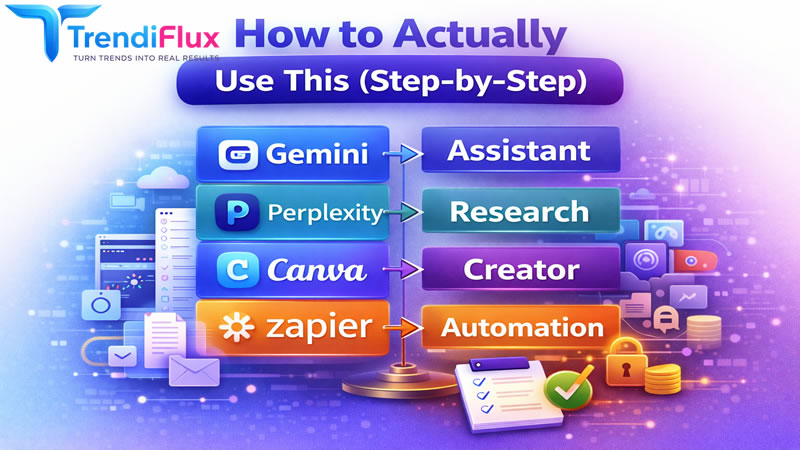
A business example is a US local service company that uses Gemini for email drafts and meeting notes, Zapier Agents for lead routing, and Canva for quote graphics and social posts. That mix keeps the team moving inside familiar tools while trimming manual admin. A project example is a content creator launching a 30-day content series. They can draft in ChatGPT, verify facts in Perplexity, refine the copy in Grammarly, and publish visuals in Canva or Firefly.
Personal test: take one task you repeat every week. It could be an inbox cleanup, a blog outline, a proposal, or a meeting summary. Time it once without AI. Then time it again with one tool only. Keep the tool only if it removes at least two manual steps. That is the fastest way to separate hype from real value.
Also, check out the best AI video generators trending right now.
This trend is growing because AI is becoming embedded, not separate. The strongest products now offer agents, workspace integration, research modes, automation, and connectors. Google, OpenAI, Adobe, Microsoft, and others are all pushing AI into the flow of work rather than keeping it in a separate chat box. That is why the latest AI tools 2026 are catching on faster with businesses, creators, and beginners alike.
It also explains why Top AI Tools You Must Try in 2026 is not about novelty anymore. It is about leverage. The tools that win are the ones that reduce switching, shorten research, clean up writing, automate repetitive work, and help you produce more without burning out. (Zapier)
The real win in 2026 is not using every AI app you see on social media. It is choosing the few that actually remove friction from your day. Start with the tool that solves your biggest bottleneck first. If you need writing help, begin with ChatGPT or Grammarly. If you live in Google tools, use Gemini. If you need research, use Perplexity. If you want automation, use Zapier. If you need design, use Canva or Firefly. That is how Top AI Tools You Must Try in 2026 becomes a practical growth system instead of a random tech list.
Do not wait until your workflow feels broken to fix it. Pick one task this week and run a small test. Then keep the tool only if it saves time, improves quality, or removes repetition. The best AI stack is not the biggest one. It is the one you actually use every day.
Trends are evolving faster than ever. TrendiFlux helps you stay updated with real insights, practical strategies, and trending opportunities so you can grow, adapt, and stay ahead in today’s digital world.
1) Which AI tools should I use first?
Start with ChatGPT, Grammarly, and Canva if you are new. They are the easiest path to faster writing, cleaner communication, and simple visuals.
2) Are free AI tools enough in 2026?
Yes, for learning and light use. Free tiers are usually enough to test workflows before you pay for more memory, more usage, or team features.
3) What are the best AI tools for beginners?
ChatGPT, Gemini, Canva, and Grammarly are the best starting points. They are popular because they fit normal work habits instead of forcing a complicated setup.
4) Which AI tools are best for content creators?
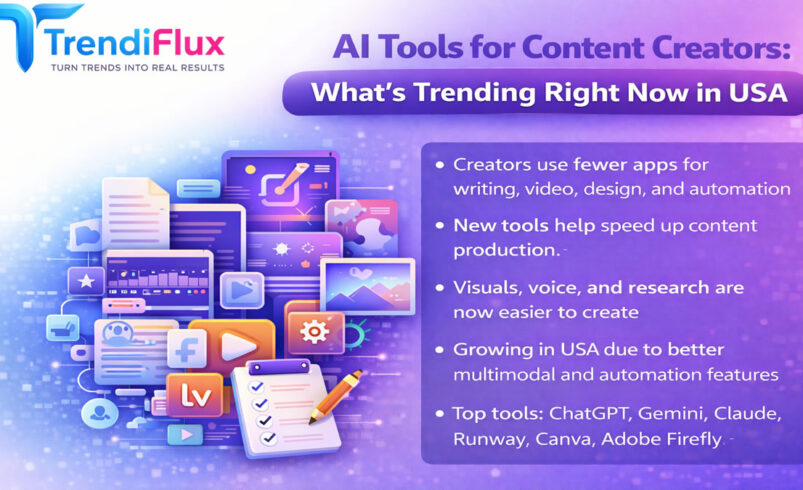
Canva Magic Studio and Adobe Firefly are the strongest creative picks. Pair them with ChatGPT or Claude for ideas and Grammarly for polishing the final copy.
5) Are the Top AI Tools You Must Try in 2026 worth paying for?
Yes, when the tool removes a real bottleneck. Paid plans make sense when you need higher limits, longer context, stronger team features, or automation at scale.